Boost Your Web Surfing - Remove Pop-ups, Ads and Animations
 Webwasher is a proxy server application which allows user to filter out undesirable content that user specify, including ads, animations, scripts and more. It provides user a basic interface, made up of basic checkboxes with a few option windows. Click in front of check boxes which you want to filter out.
Pop-ups, misdirected URLs, large images, scripts, and animations can be easily set to not display. It also crush cookies. It can also be used to block some websites. It provides user a secure and safe search.
Webwasher is freely available on internet for personal use. However, you need to purchase it for using in enterprise(bussiness purpose).
Click Here To Download
The Pirated Intelligence #
Be Smart Than Others !!! --- Install XP from DOS

If XP will not install from the CD or if you have a new drive with no operating system on it yet try these:
Install Windows XP from the hard drive with Windows 98 already installed:
Boot Windows 98
Insert the XP CD into your CD reader
Explore Windows XP through My Computer
Copy i386 folder to C:\
Go into C:\i386 folder and double click on winnt32.exe to launch the setup from the hard drive
Install Windows XP from DOS (ie. no OS on a new hard drive):
Boot with a Windows 98 Start Up disk
Insert the Windows 98 CD into the CD reader
Run smartdrv.exe from the Win98 directory on the windows 98 CD (file caching)
Type cd.. to back up to the root directory
Insert Windows XP CD into the CD reader
Copy the i386 folder to C:\
Go into C:\i386 folder on C: and type winnt.exe to launch the setup from the hard drive.
Improve SATA hard disk performance (IDE to AHCI)
There is an easy solution that will allow you to switch between IDE and AHCI in the bios and Windows will boot without any problems. The key is to enable the AHCI driver in Windows before you make the setting change in the BIOS.
For most users this will work:
1. Open Registry Editor and navigate to HKEY_LOCAL_MACHINE\SYSTEM\CurrentControlSet\services\msahci.
2. Right click on the Start registry DWORD and select Modify.


If you are using a RAID adapter or other interface try the following:
1. Open up Registry Editor and naviage to HKEY_LOCAL_MACHINE\SYSTEM\CurrentControlSet\services\iaStorV OR HKEY_LOCAL_MACHINE\SYSTEM\CurrentControlSet\services\iaStor.
2. Repeat the steps above.
Not all users will see a major performance improvement with AHCI and a SATA hard drive but NCQ can be very helpful under the right workload. Post your experience and setup in the comments below
Send Video Emails which will Self Destruct After Viewing


Make Your Own Torrents Using uTorrent !!!


In today’s edition of Iampirated we’ll show you how to create and share a torrent using uTorrent—be sure to read the first part of the series, where we explain what BitTorrent is and how it all works.
How to Create a Torrent
Before you can share a torrent file, you’ll need to make sure to get your tracker’s “announce” URL. This is the address that your tracker uses to announce torrents and keep track of everything, and is usually in the format of:
http://tracker.whateveryourtrackersiteis.com:port#/announce
Aside from the files you’re sharing, this is the second most important piece of information, so be sure it’s accurate or else your torrent won’t work. Once you’ve figured that out, fire up uTorrent and then click on the button that looks like a magic wand, or go to File > Create New Torrent.

You’ll see something like this—click on Add file or Add directory depending on what you’re going to be turning into a torrent. As you can see here, I’ve chosen a directory of high quality wallpapers I created.

We can’t emphasize this enough, as most people forget this and wonder why their torrent doesn’t work. This is especially important if you’re on a private tracker, i.e. one you need to be registered for.
You’ll probably want to choose some of the options under the “Other” section:
* Start seeding: Select the Start seeding option when you want to post the torrent as soon as you create it, but you can choose to manually start seeding later if you aren’t uploading your torrent file right away.
* Preserve file order: Choose the Preserve file order option when you have a folder structure that you’d like the torrenters to choose from.
* Private torrent: Be sure to uncheck Private torrent if you’re uploading to a public tracker. More on this in a future lesson.
When you’re ready, click Create and save as… to save your torrent file. That’s it!
Upload Your Torrent File
Now, you can upload this torrent to your tracker, usually with a new forum or blog post with details of what you’re including. Be aware that if you move your source files or close uTorrent, you will not seed, so be sure you don’t do either of these until you fulfill your initial seeding requirements. Again, if there’s any doubt, check the Rules sections of your tracker. Remember, sharing is caring!
Block unwanted calls in India by National “do not disturb” DND

First join the do not call registry. http://ndncregistry.gov.in/ndncregistry/index.jsp. This will maintain all subscribers list who have opted for “do not disturb service”.A telemarketer will lose his license or face a fine of 500 Rs per call or sms he sends you after you register to DND service.
Stop unwanted calls in Airtel:
Airtel postpaid and prepaid mobile users sms “START DND” to 121 and broadband and landline customers call 121.
Stop Unwanted Calls on Vodafone:
You need to send a SMS ACT DND to 111
Block calls from Reliance:
http://www.reliancecommunications.co.in/Communications/Rm/rm_index.html and fill up a form to register to dnd.
Stop Calls on Idea Callular -
Call up 1909 to register to DND.
or SMS “START DND” to 1909 and for un-listing / de-activating DND send “STOP DND” to 1909.
Tata Indicom:
http://www.tatatele.in/dnd/DNDAction.do use this link to activate DND.
Tata Docomo:
If you want to register yourself on the NDNC registry, simply SMS START DND to 1909 (toll free) and in case you want to de-register yourself from the NDNC registry SMS STOP DND to 1909 (toll free).
BSNL:
http://pdnc.bsnl.co.in/
Interactive Voice Response System (IVRS) – Call Toll-free number 1909 and follow the IVRS instructions for registring/de-registering.
SMS – Send SMS to 1909 with keywords ‘START DND’. It will be registered. For de-registering SMS ‘STOP DND’ and it will be dergistered.
“Here you have” Virus - W32/VBMania@MMere
A new version of "I love you" virus/worm called "Here you have" Virus came out of the underground. All it does when ran is distribute itself using your addressbook. Many big corporations were hit, and antivirus software had to release an emergency updates.
Here are some details on the virus and how to detect it and clean it:

Antivirus vendors and the US-CERT have issued alerts of a worm spreading through email with the subject "Here you have" and being identified as the W32/VBMania@mm or “VBMania” worm by McAfee, W32.Imsolk.B@mm by Symantec, or simply the “here you have” virus.Removing W32/VBMania@mm
The virus has been spreading primarily via email, asking recipients to click on a link masked as a PDF file that actually links to malware being hosted on an external server. In a sample, an emailed contained a link to “PDF_Document21_025542010_pdf.scr’” which directed users to malware hosted on the domain “members.multimania.co.uk.”
When a user clicks on the link, their computer instantly downloads and launches the malware. It then copies itself into the Windows directory using the name CSRSS.EXE, an identical file name to a legitimate Windows file, according to McAfee researchers.
Symantec warned that the worm also attempts to spread from computer to computer over local networks (other computers on a home or office network) by copying itself to shared drives on the network. Once the threat copies itself to another machine, if a user opens the folder that contains the threat, it will launch and start a whole new cycle.
Make Sure Downloads Are Safe Before Downloading Them !!!!
VirusTotal is an online service that scans files for viruses with over 40 different security tools. Since there have been security concerns with a wide variety of files that are normally safe, such as PowerPoints and PDF files, we’d recommend you scan any file you’re downloading, especially if it’s from an unknown source. To do this, just right-click on the file’s link, and select Copy link address.


After a few moments, you’ll see the results of your file’s virus scan. If it shows that nothing was detected, then you can feel fairly safe that the file is fine to download and use. It is possible for a new malicious file to slip by all of the scanners, but very unlikely.

If one of the scanners does detect malicious content, it’ll list what it detected. Do note that sometimes a scanner will wrongly think a file contains a virus when it’s in fact clean, so if the majority of the scanners report that the file’s ok, you may still be fine to use it.
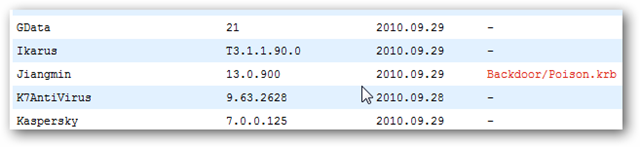

You can use this same trick to check any website for malicious content, even if it doesn’t contain a download. If you’re emailed a link or come across a search result you’re unsure about, feel free to copy the URL and scan it with VirusTotal as before to see if the site contains malicious content.

Top 10 Android Advantages ::
# Android can Run Multiple Apps at the Same Time:
The current version of iPhone OS does offer limited multitasking, but only allows native applications such as Mail, iPod and Phone to run in the background. Android users benefit greatly from this discrepancy, as they can receive notifications, listen to music, or even record GPS data without keeping the application open.
# Android Keeps Information Visible on Your Home Screen:
Android has is a customizable home screen which keeps active widgets right at your fingertips, always accesible and always visible – without having to launch an application first.
# Android Has a Better App Market:
It’s true that Apple’s App Store has over 180,000 applications, while the Android Marketplace has only just broken the 50,000 mark but Android’s rapid growth and adoption give it the potential to catch up to the iPhone App Store. Android also has another advantage: a completely open market.
# Android Gives You Better Notifications:
The iPhone has some trouble with notifications. Because it’s restricted to pop-up notifications, it can only handle one at a time
# Android Lets You Choose Your Hardware:
Apple users are encouraged to “Think Different” but when it comes to the actual hardware, they don’t get much choice.
# Android Lets You Choose Your Carrier:
AT&T truly is the iPhone’s weakest link. The iPhone’s success turned the country’s fastest 3G network into a staggering mess of dropped calls and dodgy data connections.
# Android Lets You Install Custom ROMs:
Android has a small community dedicated to building custom ROMs for Android devices. Not only do Custom ROMs bring the same functionality Jailbreaking does, but they also bring an additional level of customization to your phone.
# Android Lets You Change Your Settings Faster:
iPhone users are stuck digging around in the system settings every time they want to use the internet or a Bluetooth device. Android lets you use widgets to manage your settings directly from your home screen
# Android Does Google and Social Integration:
The iPhone can do this only through use of third party apps, and is nowhere near as seamless to use as the Android alternative.
# Android Gives You More Options to Fit Your Budget:
Every major cellular carrier (except for AT&T) has at least one Android phone available free with two-year agreement. Of course these are lower end Android devices, but they are still comparable in performance to the iPhone 3GS.

WHAT IS ANDROID ?
ANDROID is the first free,open source,and fully customizable mobile platform .android offers a full stack and operating system middleware and key movile applications
it all started in octo 2003 as android inc… co-founded by andy rubin,rich miner………….

google bought android and added list to the services -google was entering the wireless world .Android is built on the open linux kernel.android is open source it can be liberally extended to incorporate new cutting edge technologies as they emerge.the platform will continue to evolve as developer community works together to build innovative mobile applications.
the first android phone was released in 2007.since its launch,millions of handsets have been sold in north american and european markets.besides thousands of applications have been built for the android platform.in 2009 12 carriers launched 15 handsets running android
Mobile Running Adroid ----
NETRA , A cellphone application that test your eyes
If you have a cell phone , next time you don’t need to visit an ophthalmologist for your eye test , thanks to the efforts of an Indian-origin American scientist, who has developed a simple method of testing eyes by using a smartphone and a specially designed eyepiece.This complete device together with plastic tool and software application has been given a name ” NETRA “Near-Eye Tool for Refractive Assessment.
NETRA is a Sanskrit word for ‘eye’ . NETRA is developed by a group of researchers led by India-born Ramesh Raskar at the media lab of the Massachusetts Institute of Technology (MIT). This device will soon be field-tested in India in collaboration with the Hyderabad-based L. V. Prasad Eye Institute.
NETRA currently works with phones having high-resolution displays. But researchers are expanding the range of phones that it can work on and are also developing pattern designs that can work with low-resolution phones.
Run PlayStation 2 (PS2) Games on Your PC with PCSX2
There has always been a gap between computer gamers and console gamers. Generally because of the impossibility of a console gamer to play computer games or a PC gamer to play console–only games. Luckily for us, some people just don’t understand when to quit and keep on trying to create a bridge between consoles and computers as far as gaming is concerned.


Let’s continue by configuring the sound. My personal favorite is SPU2-x 1.1.0. Choose the “configure option” and make sure you use Linear Interpolation and XAudio 2. These should be the recommended options so you won’t have any trouble (don’t tick any other option… it will make the emulator highly unstable).

For the Cdvdrom emulator, it’s best that you use Gigaherz’s CDVD Plugin 0.7.0 and choose the drive you will be inserting the CD in. Side note: if you are planning to use disc images and not actual discs, I advise you to load them up with a third-party tool, such as Alcohol or Daemon Tools.
The last part of the basic configuration is the First and Second Controller configuration. My personal favorite is LilyPad 0.9.9. Choose this plug in, then press configure and start configuring your buttons (I can’t help you on that one because you know better than anyone how you want to play. A word of advice, though: the L Stick controls movement in most PS2 games so you might want it configured to your arrow keys or WASD keys. The R Stick usually controls the camera.

So, you have configured your game, yet it still runs slowly? Then, let’s get to the more advanced options, shall we? First of all, Cpu Config: if you don’t have at least a dual core CPU, don’t even think about running the PCSX2, since it is pretty CPU intensive. If you have at least a dual core, just tick all the options in order to get maximum speed and choose Limit for the Frame Limiting option. Normal will give you lower speed, Frame Skip will give you bad FMV in most games and VU Skip is Frame Skip just worse.
The “Game Special Fixes” menu allows you to choose custom options for certain games that sometimes happen to have a good effect on other games as well. It’s best if you tick them all.
Now, heading to the PCSX2 Speed Hacks menu. Although it has a lot of options that increase speeds, I have found it works best when you use a Default Cycle Rate and enable INTC Sync Hack, IOP x2 Cycle Rate, as well as WaitCycles Sync Hack. After pressing OK, head over to the Advanced Options tab where you should just choose the default options and not bother yourself with anything else (really touchy, this one).

Even if the configuration is officially over, you should know that in order to play PS2 games, you need a bios dump from a PlayStation 2 console (put it in the Bios folder… that’s what the Bios folder is for). Although there are many easy (illegal) ways to obtain the files, I strongly recommend the legal way: using a bios dumper and dumping the bios from a PS2 console. These settings allowed me to play PS2 games at more than acceptable speeds.
It has worked on two low to medium-end PCs: an Intel Core 2Duo CPU E7200 2.53GHz, 2046 DDR2RAM with GeForce 8600 GTS 512VRAM AND an AMD Athlon 64 X2 2.1 GHz, 2046 DDR3 RAM with GeForce 8500 GT 512 VRAM/ATI Radeon X1300 with 512VRAM.


Logo



